An exchange rate is the rate at which one country's currency will be exchanged for another. It is also regarded as the value of one country’s currency in terms of another currency.
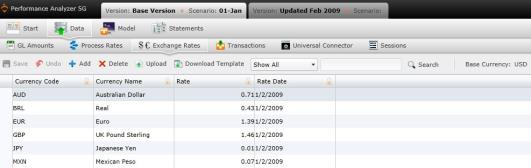
You can navigate to the Exchange Rate screen by selecting "Exchange Rate" under "Data" on the Main Menu.
The Exchange Rates screen allows you view and add or delete exchange rates that are used in the calculation.
Note that the base currency is reflected on the actions ribbon.
To add an exchange rate manually:
 . A new row will appear in the table. Type the new exchange rate and its data inside the fields.
The Exchange Rates table contains the following columns:
 to save the new exchange rate.
 . A download pop-up screen will appear. Choose your options and select "OK."
 . The "Upload" panel will open. .
What if the records fail to upload?See Edit Failed Records.
Select  at any time to delete any changes you have made. Select
  to delete an entire process.
Related Topics: